Unlock 3x QPS and microsecond latency with Memorystore for Valkey 9.1
At Google Cloud, we are committed to delivering the best managed experience backed by open

At Google Cloud, we are committed to delivering the best managed experience backed by open source software. Today, we’re announcing the general availability of Memorystore for Valkey 9.1, which achieves up to 3x queries per second (QPS) at microsecond latency compared to Memorystore for Redis Cluster.
Our support for Valkey dates back to 2024, when Redis Inc. shifted its licensing away from the permissive open-source BSD license to a dual-license model. In response, Google Cloud, alongside other technology leaders, backed the creation of Valkey, an open-source alternative governed by the Linux Foundation.
Valkey has come a remarkably long way since then, delivering major performance and feature updates that push boundaries far beyond the original fork. Valkey is particularly compelling for organizations scaling AI and microservices to handle millions of concurrent users. Here, backend developers and architects must deliver both massive throughput while also maintaining microsecond latency.
In this blog, let’s take a look at how Valkey 9.1 achieves its performance, new developer capabilities, how to get started, and how customers are using it.
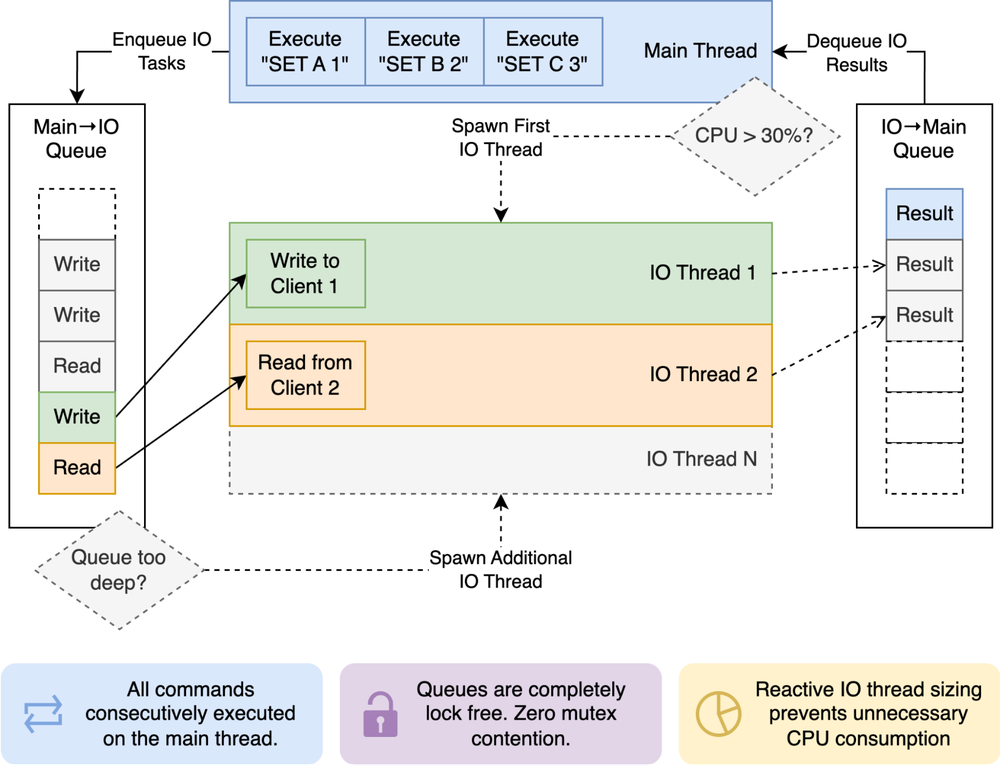
In high-throughput, in-memory datastores, efficient I/O offloading is critical to keeping the main execution loop unblocked. Previously, Valkey assigned client sockets to I/O threads statically in a round-robin fashion, requiring the main thread to continuously poll lists of pending clients to detect completed work.
Valkey 9.1 replaces list-polling with a lock-free, multi-queue messaging architecture that eliminates cross-thread CPU waste and unlocks dynamic work balancing. It involves three complimentary queues:
Main thread to I/O thread queue: Dispatches read and write jobs to a single-producer multi-consumer (SPMC) queue. Free worker threads pull tasks on demand, enabling dynamic work-stealing that prevents thread starvation or hot-spotting.
I/O thread to main thread queue: Worker threads push completed tasks into a multi-producer single-consumer (MPSC) queue. The main thread pops completed work instantly, eliminating busy-wait list iteration.
I/O thread-specific queues: Dedicated single-producer single-consumer (SPSC) queues handle thread-affine memory cleanup and high-volume epoll offloading.
Valkey 9.1 also replaces static thread thresholds with a two-phase dynamic scaling engine:
CPU-driven “ignition”: When main-thread CPU usage crosses 30%, the engine automatically activates the first background I/O thread to absorb incoming traffic before queue bottlenecks form.
Queue-depth auto-scaling: Once ignited, Valkey dynamically scales the number of active I/O worker threads up or down based on real-time SPMC queue backlog, ensuring extra cores are used only when needed and parked when idle.
Beyond raw performance, Valkey 9.1 addresses key feature requests from engineering teams with powerful new commands and enhanced security controls. Here is a look at what you can do with these new capabilities:
We recently launched support for access control lists on Memorystore for Valkey to provide more granular key-level and command-level authorization using IAM. This foundational security mechanism is offered at no additional cost and includes the following capabilities:
Centralized management: A 1:N mapping approach allows you to define a single ACL policy and attach it across multiple clusters.
Secure multi-tenancy: Organizations can easily enforce least privilege and secure multi-tenancy across their database fleets.
Enhanced observability: The feature includes versioned policy revisions and comprehensive audit logging.
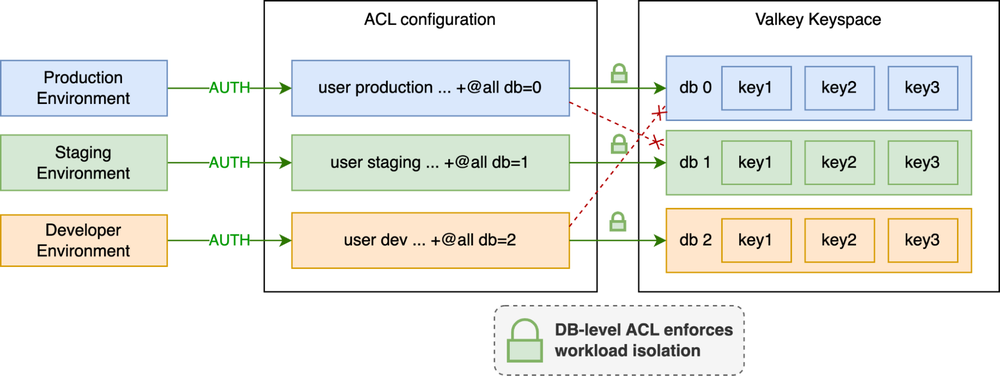
Previously, ACL rules applied globally across an instance. Valkey 9.1 allows administrators to restrict user access at the specific numeric database level within the ACL framework.
Real-world example: You can configure a staging or service-specific user and isolate their access strictly to non-production databases:
production user: @all ~* db=0
staging user: @all ~* db=1
dev user: @all ~* db=2
Protect against unauthorized data access and guard against application bugs by leveraging database-level access control across multiple databases, all without needing to prefix your keys.
Previously, scanning keys across a large cluster required querying nodes individually. This approach was not cluster- or failover-aware. Consequently, scans could miss keys, return duplicates, or fail if slot migrations or node failovers occurred during the process.
The CLUSTERSCAN command addresses these limitations by introducing a topology-aware cursor. This cursor encodes the current slot, the fingerprint of the local hashtable, and the local cursor. With this additional encoded information, clients can scan keys across the entire cluster while gracefully handling topology changes and redirections.
CLUSTERSCAN supports two primary scanning strategies:
This strategy is suitable for simple scripts or background jobs that prioritize simplicity over speed. The client starts with cursor 0 and sequentially traverses all slots in the cluster:
To continue the scan, pass the returned cursor to the next call. The cursor automatically transitions to the next slot when the current one is fully scanned.
The scan is complete when the command returns a cursor of “0”.
This strategy is suitable for high-throughput scans. Using the SLOT argument restricts the scan to a specific slot, allowing you to partition the 16,384 slots across multiple parallel workers.
Worker 1 (Scanning Slot 0):
Worker 2 (Scanning slot 1000 in parallel):
From here, Worker 1 continues to pass SLOT 0 and Worker 2 continues to pass SLOT 1000. Mismatching the slot and the cursor returns an error. Once all 16384 slots have been scanned, the cluster scan is considered complete.

HGETDEL: Atomic fetch and delete
A frequent application pattern involves reading a hash field and deleting it immediately (such as consuming single-use authentication tokens or short-lived session states). Valkey 9.1 introduces HGETDEL, which retrieves the value of a hash field and deletes it atomically in a single network round-trip.
Real-world example:
HSET user:1001 temp_token “abcde”
(integer) 1
HGETDEL user:1001 FIELDS 1 temp_token
1. “abcde”
HGET user:1001 temp_token
(nil)
MSETEX: Shared expiration for multiple keys
To eliminate multi-command pipeline overhead, the new MSETEX command enables setting multiple keys simultaneously with a single, shared expiration time.
Real-world example: Setting up a temporary session state where multiple distinct keys must expire together in 300 seconds:
MSETEX 2 session:auth “ok” session:user_id “1001” EX 300
(integer) 1
TTL session:auth
(integer) 300
Enhanced HSETEX with conditional flags
HSETEX now supports the NX (only set if the field does not exist) and XX (only set if the field exists) conditional flags.
Real-world example: Initializing a rate-limit threshold field with a 1-hour TTL, ensuring you don’t overwrite an existing active limit:
HSETEX config:123 NX EX 3600 FIELDS 1 “rate_limit” “100”
(integer) 1
The release of Valkey 9.1 builds upon the major updates we unveiled for Memorystore for Valkey at Google Cloud Next ’26:
Built-in modules for AI & vector workloads: Native JSON support and Bloom filters enable fast document querying and membership checks.
Six new node sizes: To help you manage costs and scale, we added six new node sizes.
Small Size Nodes: Custom-Pico (1.25 GB), Custom-Micro (2.5 GB), and Custom-Mini (3.5 GB) for lightweight microservices and dev/test environments. These are only available for cluster mode disabled environments.
High CPU and Large SKUs: HighCPU-Medium (8 vCPU/13 GB) and Standard-Large (8 vCPU/26 GB) optimized for CPU-heavy applications.
XXL SKU: Highmem-XXLarge with 110 GB RAM and 16 vCPUs per node for massive cluster consolidation to power your most demanding workloads.
(Note: The figures above are based on open-source benchmarks; actual performance improvements will vary depending on your specific workloads.)
Having to self-manage your Redis OSS /Valkey caching layers drains valuable engineering bandwidth and creates operational friction during scaling. We are also excited to announce a new migration workflow to Memorystore for Valkey.
With this release, migrating your infrastructure is straightforward, fully managed, and requires a simple configuration change on your application to point to Memorystore for Valkey once your data is migrated. This workflow is generally available.To move off self-managed Redis or Valkey to fully managed Memorystore for Valkey, follow these four steps:
1. Provision the target instance: Deploy a Memorystore for Valkey instance configured with your required shard count, node sizing, and clustered database options.
2. Establish online replication: Initiate continuous, dual-sync online migration directly from your source database to Memorystore.
3. Validate data synchronization: Monitor replication metrics in real time to verify full dataset alignment and low-latency replication health.
4. Execute the cutover: Switch application connection endpoints over to Memorystore for Valkey to start using the new cache.
Already, over 95% of the top 100 Google Cloud customers already rely on Google Cloud Memorystore to power demanding, high-throughput workloads, led by increasing numbers of Memorystore for Valkey users.
Consider the fast-paced world of live sports, where delivering a flawless digital experience is of utmost importance. When a game-changing play happens, millions of fans immediately reach for their devices to check real-time stats, watch highlights, and engage with interactive features. These massive, unpredictable traffic spikes require an underlying architecture capable of immense scale. For organizations like Major League Baseball (MLB) , a partner since Valkey’s early days, managing unpredictable traffic spikes without compromising performance is essential.
“We trust Memorystore for Valkey to power the massive scale of live baseball, delivering real-time stats and uninterrupted digital experiences to millions of fans. As we look ahead, we are incredibly excited about the Memorystore for Valkey 9.1 launch. The engine optimizations and latency enhancements will give us even more horsepower to handle the most unpredictable game-day traffic spikes, ensuring fans get the best technology-powered experience the game has to offer.” – Rob Engel, SVP of Software Engineering, Major League Baseball
Beyond the stadium, the retail industry faces its own intense scaling challenges, particularly during major shopping holidays or flash sales. Modern e-commerce platforms rely on real-time personalization, dynamic pricing, and instant inventory updates to keep shoppers engaged. A lag of even a few milliseconds can disrupt the customer journey and impact the bottom line. To maintain a competitive edge, leading retailers such as Target require ultra-responsive caching layers to power their most crucial customer-facing platforms.
“By leveraging Google Cloud Memorystore for Valkey, Target delivers ultra-low-latency, resilient caching for personalization services. We look forward to leveraging the performance enhancements in Valkey 9.1 to make our personalization platform even faster, more scalable, and more resilient during periods of peak demand.” – Scott Weide and Sumanth Huddar, Senior Engineering Managers, Target
The demand for these ultra-low-latency architectures extends far beyond sports and retail. Across the digital landscape, organizations in banking, AI-native development, digital streaming, and telecommunications all share a common mandate: the need for superfast, highly available caches. Whether it is processing high-frequency financial transactions, serving complex machine learning inferences in real time, delivering seamless global video streams, or routing immense volumes of telecom data, microsecond latency is the new baseline for success.
Stop letting cache bottlenecks slow down your most demanding applications. Experience the performance, dynamic scalability, and enhanced security of Memorystore for Valkey 9.1 today.