Introducing TimesFM 3.0 with multivariate time-series forecasting in BigQuery
Overview
Since introducing zero-shot time-series forecasting in BigQuery with AI.FORECAST — initially powered by TimesFM

Since introducing zero-shot time-series forecasting in BigQuery with AI.FORECAST — initially powered by TimesFM 2.0 and later upgraded to TimesFM 2.5 — you have been able to generate forecasts directly in SQL without training or managing custom models. However, up until TimesFM 2.5, these foundation models were limited to univariate forecasting, predicting future values from the history of a single time series alone. In practice, most real-world forecasting problems are multivariate, where related targets and external drivers like weather, promotions, and holidays jointly shape future outcomes.
Today, we are thrilled to announce the preview of TimesFM 3.0 in BigQuery. Developed by Google Research, TimesFM 3.0 is a 330-million parameter state-of-the-art foundation model designed to unlock native multivariate time-series forecasting directly inside BigQuery SQL. TimesFM 3.0 ranks #1 across all three major public time-series leaderboards — GIFT-Eval, FEV-Bench, and TIME — achieving top zero-shot accuracy on both covariate and multivariate forecasting tasks compared to existing foundation models.
Alongside its new multivariate capabilities, TimesFM 3.0 also serves as a drop-in upgrade for univariate forecasting via AI.FORECAST and anomaly detection via AI.DETECT_ANOMALIES. Existing workflows can immediately benefit from higher benchmark accuracy simply by specifying model => ‘TimesFM 3.0’.
With TimesFM 3.0, BigQuery brings enterprise-grade multivariate modeling into familiar SQL workflows via AI.FORECAST:
|
Capability |
TimesFM 2.0 / 2.5 |
TimesFM 3.0 |
|
Forecasting scope |
Univariate only |
Univariate and multivariate |
|
Target columns |
Single target |
Single or multiple targets |
|
Covariate columns with past-only values |
Not supported |
Supported |
|
Covariate columns with past and future values |
Not supported |
Supported |
To see how these capabilities work together, let’s forecast daily commuter (subscriber_trips) and leisure (casual_trips) bike rides over a seven-day horizon using the NYC Citi Bike public dataset (bigquery-public-data.new_york.citibike_trips).
BigQuery uses a single-table input format for multivariate forecasting that combines two sets of rows:
Historical observation rows: timestamps between start time (2016-01-01) and the forecast cutoff date (2016-06-01), fully populated with target metrics, past covariates, and known future covariates
Future horizon rows: timestamps across the seven-day forecast horizon (2016-06-01 to 2016-06-07) populated with known future covariates, while target columns and past-only covariates are set to NULL
This query highlights the three multivariate dimensions supported in TimesFM 3.0:
Forecasting correlated targets (target_cols) Instead of running separate models for each rider segment, passing TARGET_COLS => [‘subscriber_trips’, ‘casual_trips’] forecasts both metrics jointly in a single call. TimesFM 3.0 captures the cross-series dynamics between commuter and casual riders — such as shared weather sensitivity and diverging weekend ridership patterns.
Using past covariates (past_covariate_cols) Some signals can only be observed historically and are not known in advance, such as average ride duration (avg_duration_min), historical foot traffic, or unplanned service disruptions. Passing PAST_COVARIATE_COLS => [‘avg_duration_min’] (with future horizon rows set to NULL) gives the model historical context to distinguish temporary shocks from underlying trends without requiring future values for that feature.
Using future covariates (future_covariate_cols) Other external drivers are known ahead of time across both the historical window and the forecast horizon — such as weekends (is_weekend), holidays, or scheduled promotions. Passing FUTURE_COVARIATE_COLS => [‘is_weekend’] (populated across all rows through 2016-06-07) allows TimesFM 3.0 to condition its seven-day predictions directly on upcoming calendar events.
The function returns structured predictions for each target column specified in target_cols. For each column in target_cols, AI.FORECAST returns a struct containing the point forecast (value) and the lower and upper prediction interval bounds:
|
date |
subscriber_ |
subscriber_trips.prediction_ |
subscriber_trips.prediction_ |
casual_trips.value |
casual_trips.prediction_ |
casual_trips.prediction_ |
time_series_type |
confidence_level |
ai_forecast_status |
|
2016-06-01 00:00:00 UTC |
44699.64 |
32590.76 |
55723.44 |
4581.32 |
1727.91 |
9189.31 |
forecast |
0.95 |
|
|
2016-06-02 00:00:00 UTC |
44611.75 |
30413.05 |
57209.19 |
4647.17 |
1466.23 |
10273.55 |
forecast |
0.95 |
|
|
2016-06-03 00:00:00 UTC |
41379.15 |
26218.65 |
54940.09 |
5341.36 |
1568.23 |
11805.86 |
forecast |
0.95 |
|
|
2016-06-04 00:00:00 UTC |
30164.34 |
14266.43 |
45075.92 |
9097.74 |
2558.27 |
18452.52 |
forecast |
0.95 |
|
|
2016-06-05 00:00:00 UTC |
26727.27 |
10101.44 |
42239.33 |
8398.50 |
1692.15 |
17768.99 |
forecast |
0.95 |
|
|
2016-06-06 00:00:00 UTC |
36713.84 |
19493.00 |
52679.59 |
4723.08 |
400.08 |
11710.73 |
forecast |
0.95 |
|
|
2016-06-07 00:00:00 UTC |
39749.97 |
22157.42 |
56119.86 |
4180.97 |
95.70 |
10845.74 |
forecast |
0.95 |
|
You can also run multivariate forecasts using natural language in BigQuery Conversational Analytics. On the same bigquery-public-data.new_york.citibike_trips dataset, you can simply ask “Forecast both daily subscriber and casual trips for June 1–7, 2016 using two month historical data, with average trip duration as a past covariate and weekend indicator as a future covariate.” Conversational Analytics automatically generates and executes the underlying AI.FORECAST query with TimesFM 3.0, returning a summary of the results, interactive forecast charts with prediction intervals for each target, and key forecast insights.
Multivariate forecasting with TimesFM 3.0 in BigQuery Conversational Analytics, generating 7-day predictions, interactive charts, and insights from a natural-language prompt.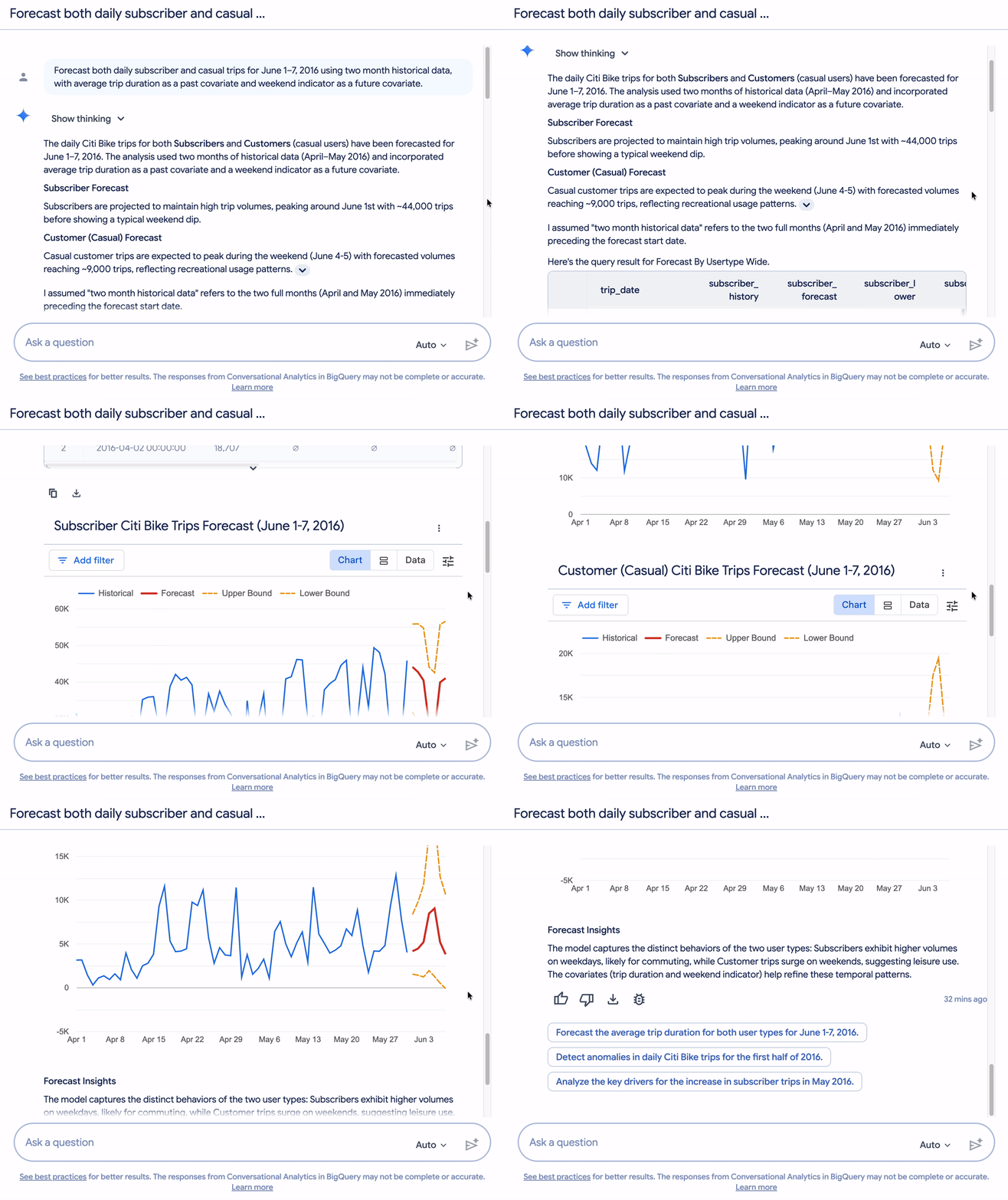
With native multivariate support in TimesFM 3.0, BigQuery brings state-of-the-art foundation model forecasting to complex, interconnected enterprise datasets without requiring data movement, custom feature engineering pipelines, or dedicated model hosting infrastructure.
To start forecasting with TimesFM 3.0 in BigQuery:
Read the Google Research blog post to learn more about the TimesFM 3.0 model architecture and capabilities.
Explore the BigQuery TimesFM documentation.
Follow the step-by-step multivariate forecasting tutorial.
Try AI.FORECAST with `model => ‘TimesFM 3.0’` directly in the BigQuery Studio SQL workspace.
Try AI.DETECT_ANOMALIES with `model => ‘TimesFM 3.0’` for univariate time series anomaly detection in BigQuery.
Try AI.EVALUATE with `model => ‘TimesFM 3.0’` for univariate time series evaluation in BigQuery.