Platform Possibilities Multiply with Ecosystem Profitability
In the AI era, platform success depends on a thriving ecosystem. When Cisco provides the

Today, we’re announcing that spend caps on Google Cloud Budgets are generally available.
With this release, we’re delivering ways to protect your workloads from runaway costs without risking resource deletion. More importantly, we’re introducing three major updates, directly inspired by your feedback since the initial preview, to bring programmability, real-time visibility, and automated guardrails to your cost-control playbook.
We have significantly enhanced the usability and power of spend caps in three ways:
1. Automation through spend caps API: Managing guardrails manually across hundreds of projects is a major operational challenge. To address this, we have launched the spend caps API, which can be accessed from the existing Cloud Billing Budgets API. You can now programmatically enforce your financial boundaries for eligible services within each project, without additional overhead. You can automatically lift, update, or delete caps on the fly and instantly apply a spend cap whenever a developer spins up a new sandbox project.
2. Real-time visibility with live cost reports: Spend caps for AI services trigger within minutes of usage using estimated, live costs. When a cap triggers, you need to know exactly why and when the limit was breached. You can now view these faster, estimated costs directly inside your Cost Reports. Instead of waiting hours for standard billing pipelines to settle net costs, you get the exact financial snapshots that triggered the enforcement, giving you the immediate context needed to run a precise root-cause analysis.
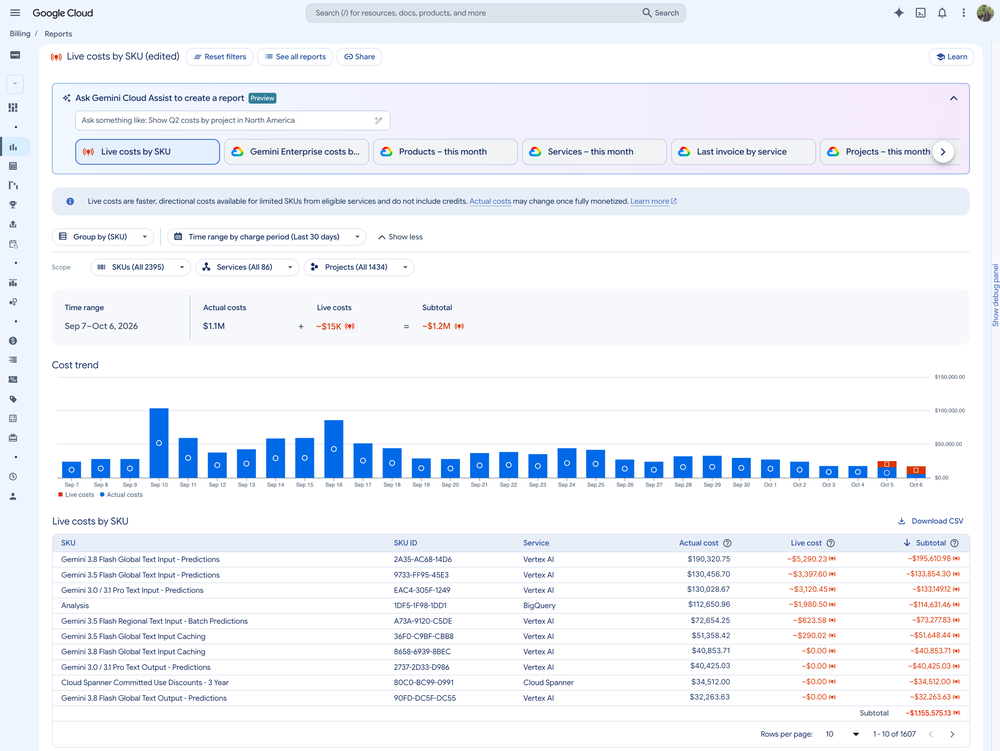
3. Automated guardrails for your monthly resets: Before, once a spend cap was triggered, the usage block remained locked until you manually lifted it in the UI. Today, we are introducing automated monthly resets. You no longer need to worry about manually lifting caps every month. Enforced spend caps will automatically reset, and blocked services will seamlessly resume at the beginning of the next month. However, if your governance policies require a strict manual audit before resuming operations, the manual override option continues to exist exactly as before.
As you roll out spend caps across your organization, keep these operational tips in mind:
Spend Caps work seamlessly alongside our native Early Anomalies Detection to provide a closed-loop defense for your cloud spend. Read our previous blog for a detailed explanation on how to use these tools to effortlessly set up a GCP defense playbook.
|
Playbook step |
Feature |
Focus |
Core action |
Key benefit |
|
Step 1 |
Early anomalies |
Predictive monitoring |
Analyzes early cost signals daily to alert you of directional spend variances |
Spot anomalous cost spikes early and pinpoint the exact SKU driving the trend |
|
Step 2 |
Spend caps |
Financial enforcement |
Programmatically pauses usage for a specific project/service once a budget is breached |
Absolute protection against runaway spend without deleting resources |
Spend caps are now ready to support your workloads at scale. Read our documentation for more details and navigate to the Budgets and Alerts page in your Google Cloud Billing Console, to set your first spend cap.
To integrate programmatic guardrails into your deployment workflows, check out our newly published spend caps API documentation.