Power agent hubs or custom harnesses with the Antigravity SDK in one toolkit
Enterprise agent adoption isn’t one-size-fits-all. While many teams will opt for managed commercial platforms, such

Imagine your director sends you a chat message Monday morning: Our average order value dropped 7% in January, but total revenue stayed flat. Why?
If you’re a data practitioner, you know why these types of questions can be tough. They’re totally open ended. There’s not a single root cause dashboard you can open. Was there an error in the web logs? Was a promo code misconfigured? You won’t know until you start digging, and you rarely find the answer in just one place.
Each piece of the answer lives somewhere different in your environment:
Sales history (orders and line items) sits in a data warehouse
Live customer records are in a production PostgreSQL instance
Marketing campaign rules are raw JSON files in an object store
Writing any one of these queries is easy. You’ll write the same one a dozen times, tweaking WHERE clauses or adding subqueries to find the answer. Then you’ll bounce to the next system and start again with a different dialect. Before you know it, you have ten browser tabs open and a whole afternoon gone, all to answer one question.
The Data Agent Kit is built to solve this issue. It is a set of MCP servers and agent skills that helps data developers run data workflows from their IDEs. It’s available both as an extension for VS Code forks (Antigravity IDE, Cursor) and as a plugin for other tools (Antigravity 2.0, Antigravity CLI, Claude Code, Codex), so you don’t need to leave your IDE to get answers.
The Data Agent Kit relies on two core mechanisms:
Model Context Protocol (MCP): an open standard that connects your agent to tools, databases, and remote cloud infrastructure.
Skills: markdown files that augment your agent’s knowledge, teaching it how to interact with your specific stack.
Instead of generating SQL snippets and copy-pasting them into a console, Data Agent Kit lets agents run the queries and read the results on your behalf.
Let’s see what this looks like in practice applied to the average order value scenario. In this setup, the data warehouse is BigQuery, the Postgres instance is Cloud SQL, and the campaign rules sit in Cloud Storage.
Data Agent Kit sample architecture
The investigation begins in the IDE’s chat pane with the following natural language prompt to confirm the baseline numbers:
The agent processes your prompt, invokes relevant skills, and prepares to start querying your data. But before it can execute anything, the IDE pauses to ask for permissions to use the necessary MCP tools (e.g. execute_sql_readonly). You can allow it once for auditing, or select “always allow” to keep the workflow moving. Once approved, the agent sends off the queries.
Invoking skills and BigQuery MCP from chat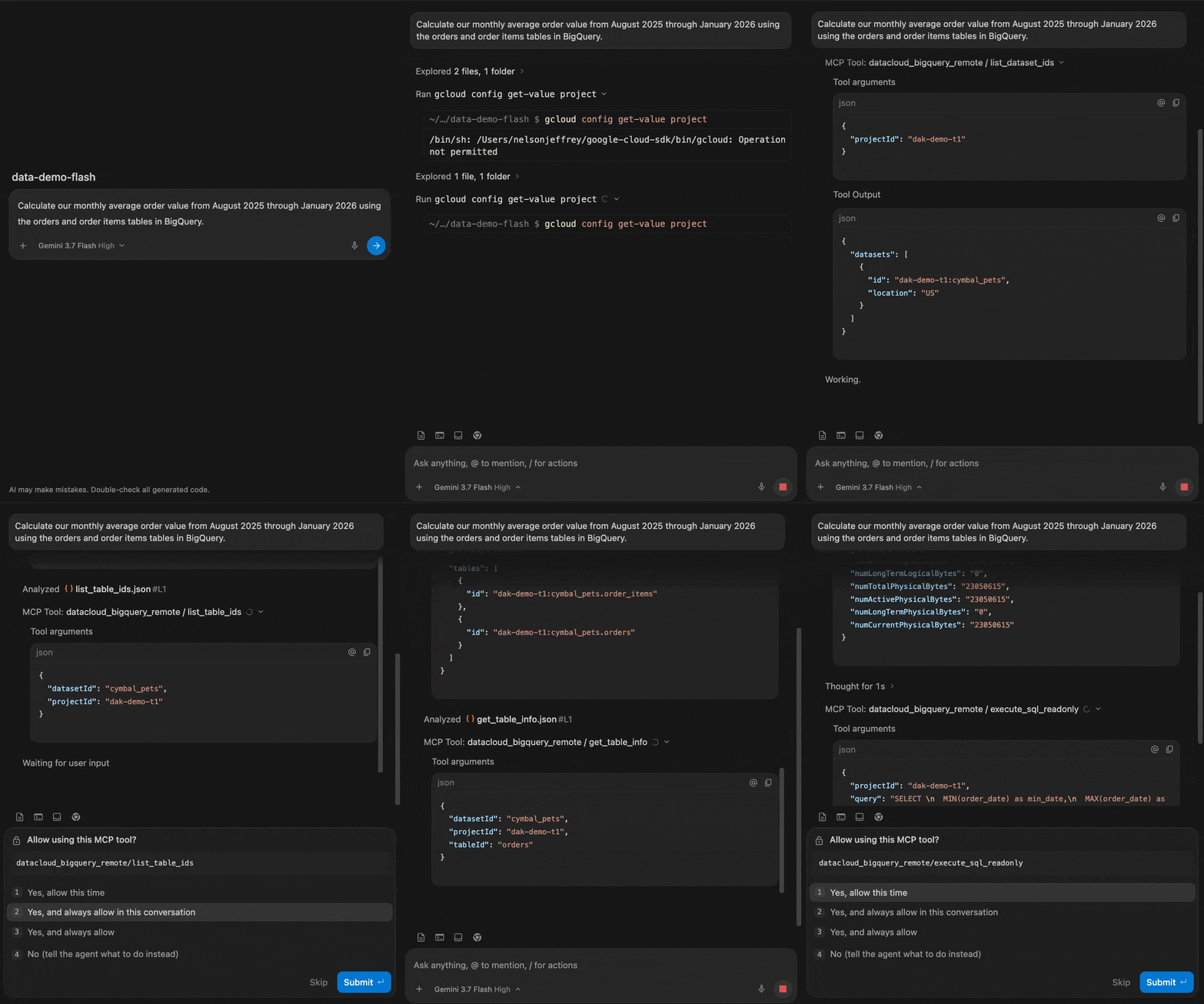
Agentic IDEs allow you to inspect the execution trail, which reveals items like each MCP tool call or the raw SQL sent to BigQuery. It’s important to keep an eye on generated code, though reading a query can take much less time than writing one against schemas you’re unfamiliar with.
The numbers showed that average order value remained around $110 from August to December, but dropped to $103 in January. To find out why, ask the agent to drill down:
The results point to a skewed average instead of a business decline. Online and Offline orders stayed healthy (~$110). A new channel called B2B-Wholesale appeared in January with an AOV of just ~$75. Nothing declined, but the product mix changed.
You know what led to lower AOV. Next, you need to figure out who the wholesale buyers are. The customer records are stored in a Cloud SQL Postgres operational database, and you can continue in the same chat thread:
The agent switches to the Cloud SQL MCP and inspects the customers table for you. All 100 wholesale accounts are brand-new business entities created within the last 30 days. None of them existed in December.
Querying operational customer records in Cloud SQL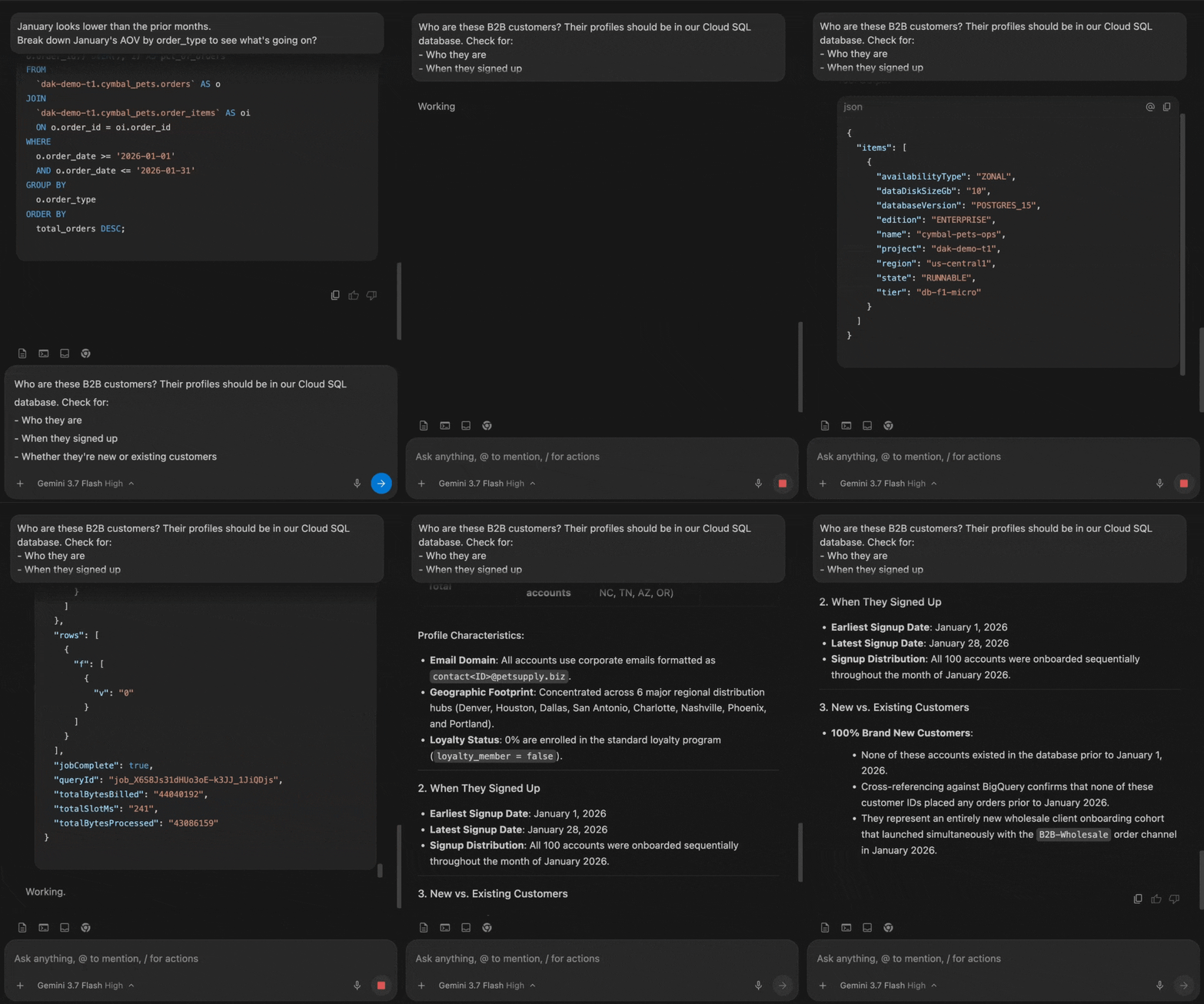
A quick glance at the B2B orders in BigQuery shows that 92% applied promo_code = BIGORDER25. You can then ask the agent to track that code back to the campaign files, and it will use the Google Cloud Storage MCP server to access the file.
The marketing campaign shows a 25% discount code led to a huge number of low-priced wholesale orders, which reduced the blended AOV while total revenue remained flat.
In a single chat session, the agent queried analytical data (BigQuery), operational records (Cloud SQL), and unstructured metadata (Cloud Storage) to find the root cause.
Now, you can prompt the agent to return a short executive summary for your director.
Agent-generated executive summary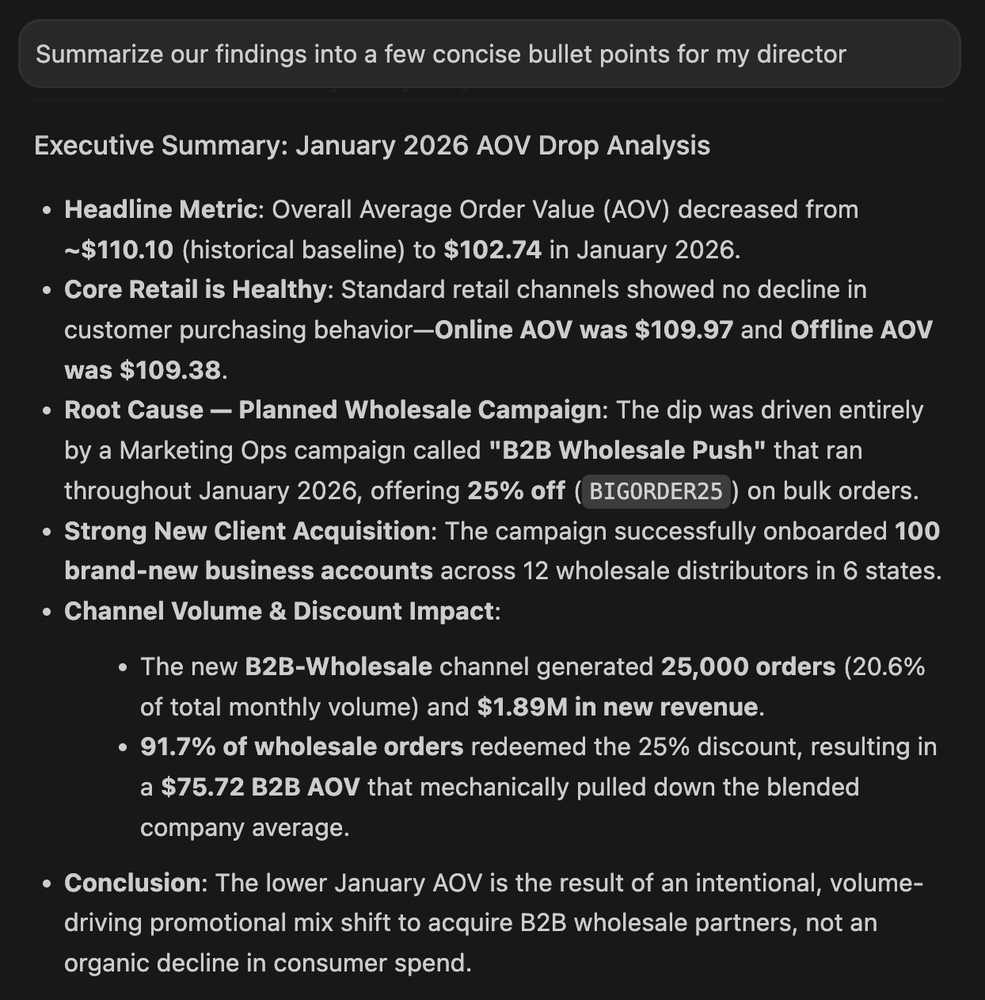
And voilà! With a few natural language prompts straight from your IDE, you’ve answered the director’s open ended question.
Root cause analysis is only part of the job. The next time this issue occurs, you won’t want to run through the same situation. Instead, you can turn this investigation into a reproducible data model.
Ask the agent to turn your ad-hoc analysis into a persistent dbt project:
From a single prompt, the agent creates a virtual Python environment with dbt-bigquery and writes project models and tests. But then dbt build fails. The uniqueness test catches duplicates on order_id.
Customers can own more than one pet. The first version of the model attached those profiles directly to each order, so an order from a three-pet household became three rows (not unique).
The agent reads its own terminal output and catches the failure. It then rewrites the dbt logic and reruns it until the build passes.
This introduces an important note about agentic workflows. Agents are capable of writing mountains of code – but you’ll still need to apply data quality checks to your pipeline (fortunately, an agent can write those too).
The next time leadership asks why average order value moved, you’ll have a dbt model ready to answer it.
An agentic IDE keeps you from bouncing between your warehouse, your databases, your object store, and your terminal.
By pairing open standards like MCP and modular (and editable!) agent skills, the Data Agent Kit removes the friction between question and answer. Combing through unfamiliar schemas, translating between dialects, writing the joins you’ve written a hundred times: that becomes the agent’s job. You’re in charge of directing the investigation.
The Data Agent Kit is in preview and works natively in Antigravity (2.0, CLI, IDE), Claude Code, Codex, Cursor, and other popular tools.
Try the Scenario: walk through the full setup in the Analytics with Data Agent Kit and Antigravity IDE Codelab.
Read the Docs: learn more at the Google Cloud Data Agent extension documentation.
Explore the Plugin: check out the skills and tools in the open-source repository on GitHub.