Introducing the Google Cloud Developer Plugin for AI Coding Agents
Agent skills fit well alongside documentation and remote MCP servers as ways of enabling the

Agent skills fit well alongside documentation and remote MCP servers as ways of enabling the success of your AI workflows. They reduce context window usage for certain use cases, and they’re straightforward to install. However, you might have noticed that managing individual skills can be unwieldy, or that some skills are most useful when they act alongside other skills or MCP servers toward the same goal. That’s where plugins come in to help.
Today, we’re thrilled to announce a new Google Cloud plugin for AI coding agents! Designed as installable bundles, agent plugins equip the AI agent of your choice with skills and tools to be more effective on Google Cloud.
As you expand your usage of coding agents, you might find that they become significantly more capable when they use related skills in tandem or with complementary context and tooling. For example, an agent analyzing infrastructure is more effective when combining domain knowledge, workflow recommendations, and the ability to interact with a live environment together.
Plugins solve this coupling challenge by packaging related capabilities into cohesive, installable bundles. This allows you to take advantage of both broad foundational capabilities and deep, product-specific tools without managing complex dependencies.
For this release, we’ve started with a foundational plugin that supports agent functionality for all Google Cloud users, focusing on making it easier for agents to retrieve Google Cloud-related skills, make use of official documentation, and handle programmatic interactions with Google Cloud.
We’ve also built our plugin in compliance with the Agent Plugins specification, an open, vendor-neutral standard for packaging Agent Skills and Model Context Protocol (MCP) servers into portable, interoperable units. Rather than requiring developers to maintain different configurations and wrappers for every AI assistant, the Agent Plugins standard provides a unified manifest and directory structure.
Our Google Cloud plugin adopts this standard to ensure that developers across a variety of AI coding environments get consistent, high-quality access to tools that help them succeed with Google Cloud. That includes not only the plugins we talk about today, but all other plugins published to the Google Agent Skills repository as well.
Let’s take a look at the flagship plugin that we’ve just published in the Google Agent Skills repository: google-cloud-developer. This plugin exists to help agents successfully navigate the fundamentals of interacting with Google Cloud: things like authentication, authorization, managing projects, and guardrails for gcloud CLI operations. This plugin also bundles configuration for the Developer Knowledge MCP server, which gives agents up-to-date grounding in Google’s official developer documentation.
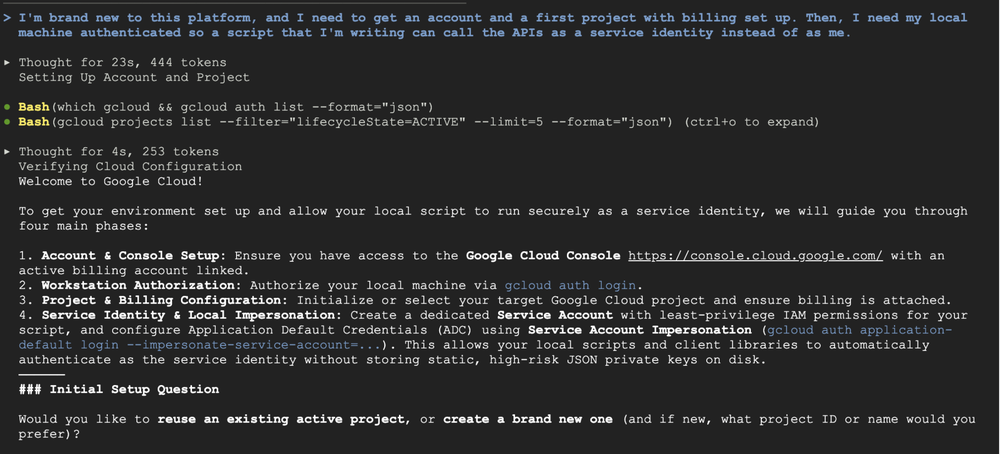
To see how this plugin works, consider a situation where you’re bootstrapping a new project as part of working on a script. With the google-cloud-developer plugin installed, you can prompt your agent:
I’m brand new to this platform, and I need to get an account and a first project with billing set up. Then, I need my local machine authenticated so a script that I’m writing can call the APIs as a service identity instead of as me.
Environment awareness: The agent silently runs background checks against your live environment for prerequisites like CLI availability and potential existing projects or organizations.
Review: The agent considers IAM best practices to avoid risks that might be assumed as part of the prompt, like accidental key leaks or git commits.
Interaction with guardrails: The agent outlines a workflow roadmap and offers to act on those steps before modifying any resources.
Because Google Cloud plugins are available from the open Google Agent Skills repository and adhere to the standard Agent Plugins layout, adding them to your environment is straightforward. For example, here’s how you’d install the google-cloud-developer plugin:
Install the plugin directly via the CLI using its path in the Google Agent Skills repository:
Add the Google plugins marketplace, then install the plugin:
Add the Google plugins marketplace, then install the plugin:
If you’re already a Google Cloud user, try the above installation steps to set up your agent for success. We think you’ll like what you see! For those who want a more guided approach, our new codelab will walk you through the installation and initial exploration of the plugin in Antigravity.
If you’re new to Google Cloud, you can also get started with instructions in our documentation to set yourself up for local development.
The most curious readers can also take a deeper look at the plugins and agent skills available to use today in the Google Agent Skills repository.