Power agent hubs or custom harnesses with the Antigravity SDK in one toolkit
Enterprise agent adoption isn’t one-size-fits-all. While many teams will opt for managed commercial platforms, such
Enterprise agent adoption isn’t one-size-fits-all. While many teams will opt for managed commercial platforms, such as Gemini Enterprise Agent Platform for turnkey agent deployment and governance, developers with bespoke workflows or custom execution engines often choose to build their own lightweight agent hubs.
If you are building a centralized agent hub from the ground up, you need tools that run predictably, log everything, and stay in their sandbox. The Antigravity SDK gives you the exact runtime engine used in Antigravity 2.0 and the Antigravity CLI, adding declarative safety policies, real-time telemetry, and stateful multi-turn persistence straight into your application. When the core runtime updates, your SDK agents get those optimizations automatically. That’s why today, we’re breaking down how the Antigravity SDK powers a complete multi-agent control plane.

A multi-agent control plane monitors and manages LLM workloads. It shows you exactly what the agent is thinking, which tools it calls, and how it stores state.
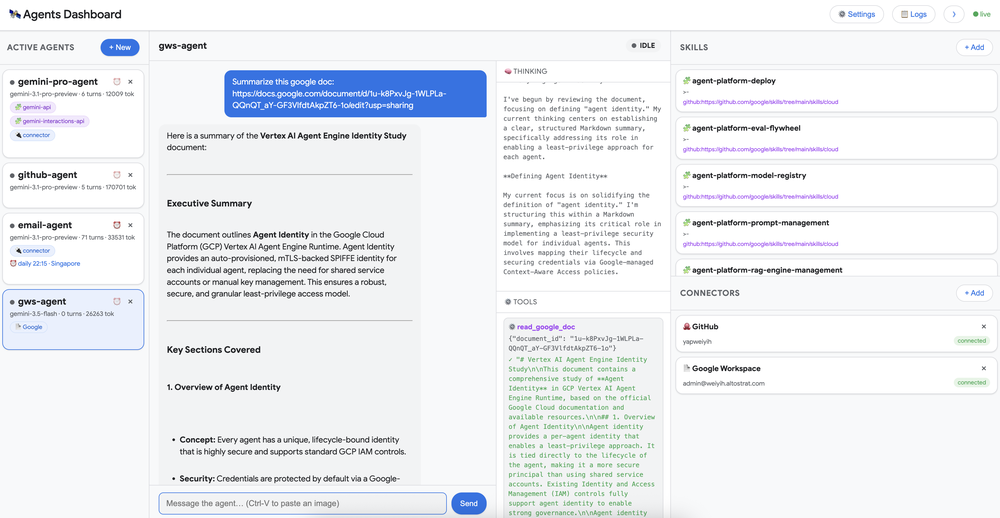
It consists of two critical components:
1. Antigravity SDK agent core: The runtime that manages model interactions (like Gemini 3.1 Pro and Gemini 3.8 Flash), runs tools, generates thinking traces, and executes skills.
2. Observability and telemetry middleware: An event-driven layer powered by Antigravity SDK Lifecycle Hooks. It intercepts agent actions like step starts, thinking updates, and tool calls, and streams telemetry over WebSockets to your dashboard.
Let’s explore a scenario where an organization is building or maintains a custom agent hub and wants to integrate Antigravity SDK-powered agents.
The problem: An operations engineer needs to monitor multiple active agents (e.g., gemini-pro-agent, github-agent, email-agent) performing background research, document summarization, and task scheduling. Traditionally, observing agent progress requires:
Tailing fragmented console logs across multiple terminal windows
Manually inspecting JSON transcripts to diagnose stuck or failing tool calls
Lack of visibility into which Skills or MCP connectors are loaded for a given agent session
Difficulty tracking cumulative token usage and execution latency
The solution: This post walks through each one: the streaming API for real-time observation, lifecycle hooks for telemetry and interception, the policy engine for steering, skills for capability management, and session state for persistence. With an SDK-powered dashboard, operators get a single view into what every agent is doing.

What happens behind the scenes?
When an operator or dashboard interacts with an Antigravity agent, the runtime coordinates execution through five core mechanisms:
Session initialization and state attachment (save_dir & conversation_id):The runtime initializes or reattaches to a session, binding execution to a root save_dir. Multi-turn trajectory logs, tool receipts, and artifacts are preserved under traj- for persistent auditability.
Skill resolution (skills_paths):Domain-specific capabilities and instructions are resolved directly from filesystem paths pointing to SKILL.md bundles, dynamically augmenting the agent’s system prompt without an external registry.
Concurrent stream generation (ChatResponse):The runtime exposes three concurrent async iterators over the single model response:
response (yields visible text tokens)
response.thoughts (yields internal chain-of-thought reasoning deltas)
response.tool_calls (yields typed ToolCall events containing .name and .args)
Declarative sandboxing and built-in tool execution:When the agent performs workspace operations, built-in tools (list_directory, find_file, search_directory, view_file, create_file, edit_file) execute strictly within configured workspaces directories governed by safety policies (such as policy.workspace_only()).
Telemetry interception via lifecycle hooks:Decorated async hook functions (@hooks.on_session_start, @hooks.pre_tool_call_decide, @hooks.post_tool_call, @hooks.on_session_end) intercept agent transitions in real time, validating or modifying tool calls and broadcasting telemetry payloads over WebSockets to the live dashboard.
The Antigravity SDK organizes these responsibilities into four core building blocks:
Skills provide reusable, domain-specific instruction bundles and reference assets that agents load dynamically. Rather than managing an in-memory registry, skills are resolved directly from filesystem directories containing a SKILL.md file:
The SDK provides production-ready file and workspace tools out of the box, which removes the need to write custom filesystem wrappers. When paired with workspaces and declarative safety policies, tools are strictly confined to authorized directories:
save_dir & conversation_id)State persistence in the Antigravity SDK is managed through declarative configuration rather than an external database. Specifying a save_dir establishes a root directory where full turn trajectories, tool receipts, and artifacts are preserved under traj-:
Lifecycle hooks allow dashboards and monitoring engines to observe and steer every stage of execution. Using decorated async functions, you can stream status updates over WebSockets, inspect tool parameters, and enforce human-in-the-loop approvals before tools run:
Get started with your own enterprise agent control plane using the following resources: